The record of processing activities
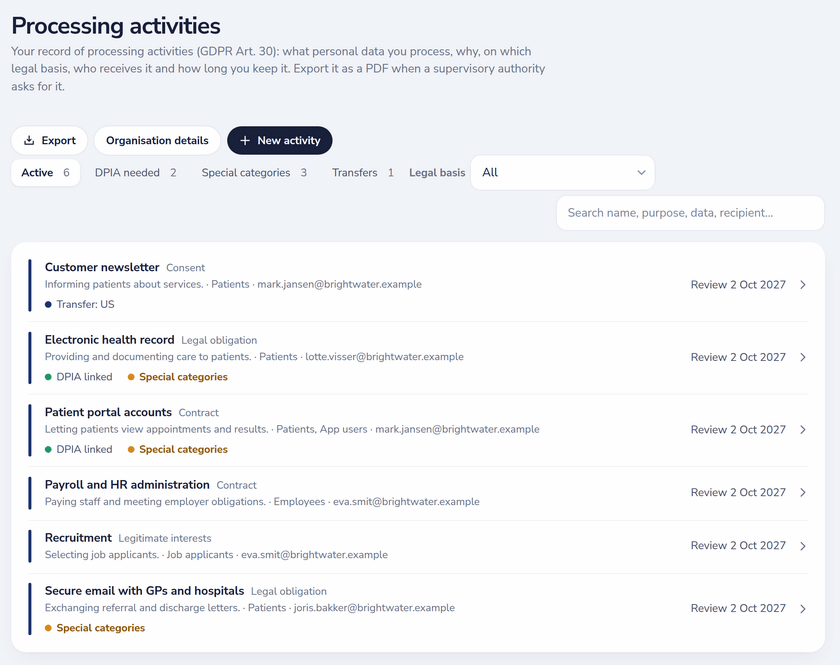
Each processing activity records what the GDPR asks for in Article 30: the role (controller or processor), purposes, the legal basis under Article 6, data subjects, data categories, internal and external recipients, retention, security measures and the source of the data. Organisation details such as the controller, a representative and the DPO are filled in once and reused.
- Choosing legitimate interests asks for a short legitimate-interests note before it saves.
- Special-category data asks for the Article 9 condition; criminal-offence data is flagged too.
- Transfers list the country and the safeguard: adequacy decision, standard contractual clauses, binding corporate rules or a derogation.
- Every activity has a last-reviewed and next-review date and shows when its yearly review is due.
- Filter by DPIA needed, special categories, transfers or legal basis, and search across names, purposes, data and recipients.
DPIA screening and the DPIA register
Screening per activity checks the nine criteria supervisory authorities use (evaluation or scoring, automated decisions, systematic monitoring, sensitive data, large scale, matching datasets, vulnerable data subjects, innovative technology, blocking a right or service) and the three Article 35(3) cases. When a DPIA is needed, the activity says so.
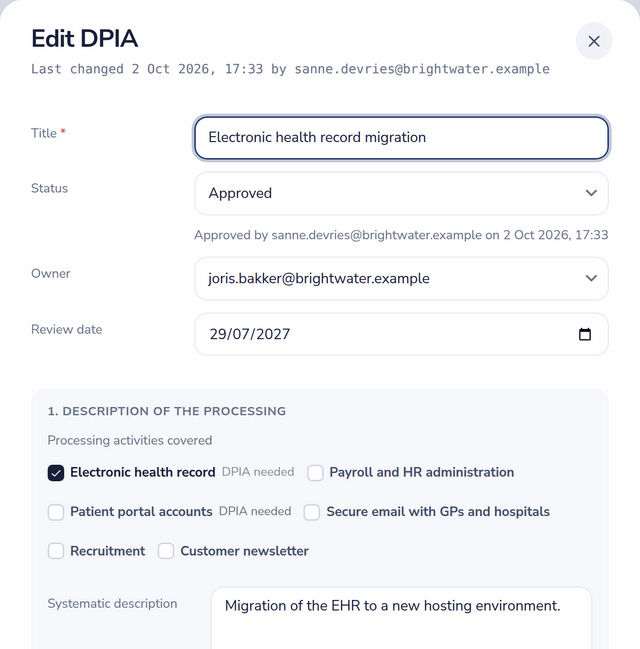
A DPIA records the processing it covers, necessity and proportionality, the risks with likelihood, severity and measures, the residual risk, the DPO's advice and whether it was followed, and any prior consultation. Status runs from draft to in review to approved; approval is stamped with who and when, and an approved DPIA turns to review due when its review date passes.
Linked to vendors, risks and controls
- Activities point to the vendors and assets that process the data, so the register and the vendor list stay consistent.
- DPIA risks can point to risks in the risk register, which then show which DPIAs reference them.
- Activities link to controls and appear in the same link graph as risks, policies and processes.
- Auditors on Pro and Enterprise read the register and the DPIAs in their own portal.
Export when the authority asks
Export the record of processing activities and individual DPIAs as PDF, or the registers as Excel and CSV. The activity log records every change to an activity or DPIA with who and when.